1. Skip to content
  2. Skip to navigation

New! CM Course Outline for Ontario’s New Civics 10 Curriculum

Extra-ExtraYou Asked, We Listened…

In 2013, Ontario’s Ministry of Education released the revised curricular outcomes for CHV20, better known as “Civics 10”.  We are proud to announce our new statement of fit for this new curriculum, and a lesson-by-lesson course outline for those interested in using Civic Mirror as the primary resource for that course.

To find this document on our website:

> Select the “Curric” tab

> Select “Canadian Courses” from the drop-down menu

> Select “Ontario’s Civics 10 Open”

Here’s hoping this save you hours upon hours of planning, and makes your Civics course one of the most talked about ones in your school!

Posted in CM News | Comments Off on New! CM Course Outline for Ontario’s New Civics 10 Curriculum

Feature Article: “Civics ~ Own It”

By Jessica Alletson, Social Science Teacher @ Glebe Collegiate Institute

This past year, Ms. Jessica Alletson wrote an incredible article that was recently published by the OHASSTA periodical Rapport, in which she mentions the role Civic Mirror played in her civic education delivery. It was so good and so inspiring that we asked if we could share it in full.

Jessica_AlletsonCivics: the course most students dread taking, most teachers dread teaching. We can all come to the conclusion that what is taught in civics is important, but the question is, how do we make it important to our students?

I recently attended a conference during Canada’s Democracy Week honouring Canada’s democracy, which interactively discussed how to teach and model democracy in our schools. This interactive discussion, put on by Elections Canada, hosted by CBC and TVO journalist Piya Chattopadhyay showcased a variety of speakers; Marc Mayrand (Chief Electoral Officer for Elections Canada), Ilona Dougherty (President and co- founder of Apathy is Boring) Frances Leblanc (Canadian Association of Former Parliamentarians),Taylor Gunn (President, CIVIX), and Joel Westheimer (University Research Chair in Sociology of Education, University of Ottawa). The connecting piece in each panellists’ personal history was that they all became interested in becoming involved in democracy at a young age, and they are all passionate about the fact that the missing link between Canada’s declining rate of involvement in democracy is the lack of youth involvement.

As educators, how should we approach the great task of instilling this interest in politics in our own students? Taylor Gunn suggested that instilling passion into the classroom begins with teachers, “engaged teachers engage students” he advised. Ilona Dougherty urged teachers to offer students opportunities to get involved; 45% of students who are not engaged in school activities said the reason was that they were never asked to be involved.

In my civics class this semester, I had the pleasure of running The Civic Mirror, an online simulation based program that turns classrooms into countries and students into citizens. Imitating real-life, students must care for their family of seven, providing housing, food, healthcare and education. Each student is also assigned a secret agenda outlining specific political and social objectives that must be accomplished to earn status points which are instrumental in ‘winning’ the simulation. As students learn about Canadian legislative, judicial and electoral policies in class, they emulate them within their fictional country, electing a government, running a house of commons, and upholding laws in a simulated courtroom.

Since each student is different, each will interact differently with democracy, and will become a different kind of citizen. At the conference, Joel Westheimer discussed three types of citizens that exist in the real world, the first is personally responsible, someone who votes, pays taxes and upholds the law. The second is simply a participant in democracy, and the third advocates for social justice, wanting to change societal norms. These three types of citizens emerged within my classroom, and it was interesting to see the classroom dynamic that stemmed from this experience. Our simulated society worked because no two people were exactly alike, just as it is in the real world.

I have never seen students more excited about subject-matter – they are connected and engaged in an authentic way. I have logged into the Civic Mirror platform during my prep period, only to find that my students were logged on in other classes doing their civics work! It stands to reason that if students become engaged in politics at an early age, it will fuel their drive to participate actively in democracy later on in life. One can only begin to imagine how powerful Canada’s youth will be in changing our country for the better. In the meantime, it is up to us as educators to plant the seed of political engagement, and wait to see how it will grow.

Jessica Alletson is a Social Science Teacher at Glebe Collegiate Institute in Ottawa, Ontario.

Follow her on Twitter @jessicaalletson.

View the Full Issue of Rapport that the article appeared in.

Posted in CM News | 1 Comment

Civic Mirror is Heartbleed Proof – and why you should care.

heartbleedUsually, when System Administration and Security are done well, they’re invisible – you only notice it when something has gone wrong and you’re waiting for a fix. Then occasionally an issue comes along that puts system security in the spotlight.

The Heartbleed Bug has done just that. In essence, the Heartbleed bug is a major flaw in a vital component of secure communication online. The end result? Attackers potentially being able to read information that is being sent via a secure connection: the sort you use to send banking info, pay with a credit card, and log into your favourite sites like gmail and yes, Civic Mirror.

How bad is this? Bad enough to have security experts like Bruce Schneier calling saying “On a scale of 1 to 10, this is an 11”.

Unfortunately some news agencies are telling everyone to change their passwords everywhere, something great to do on secured systems, but that could increase risk on a server running a vulnerable version of OpenSSL.

Our programming team kicked into action with the announcement of the Heartbleed bug, and have patched our OpenSSL to a version that is Heartbleed proof. Though our clients’ Civic Mirror countries are fictional, the time and effort they put into creating and working in them is real, as is their learning experience – not to mention their grades!

Which is why we take your security seriously. From Heartbleed to DDoS attacks, the Civic Mirror team respond rapidly to ensure the continued security of our servers and your class’ simulations.

Posted in CM News | Comments Off on Civic Mirror is Heartbleed Proof – and why you should care.

CM International Rules

Inter-Country Diplomacy, Trading, and Warfare

Military_HexShipping_hex

Civic Mirror was an inter-country game long before it was web-developed, with rules for inter-country trading, a CM United Nations event, and even warfare and country conquests. The costs to develop CM’s international rules were, unfortunately, prohibitive… and, as a result, haven’t been used in years.

In the past year, however, several teachers have been asking us if there are international rules for the game. While our plan is to create “International CM Tournaments” where participating countries compete for the highest overall score on a CM Human Development Index (e.g. mortality rate, literacy rate, disease rate, etc.), we thought we should share the original International Rules for those teachers who are interested in the CM Library (logins required).

Int_Events

If you don’t have a Civic Mirror account, register today and request a 6-Week Free Trial. And know that trials don’t start until your students start using the program. So you can prep and plan for months in advance without that counting against your trial time.

Posted in CM News | Comments Off on CM International Rules

Civic Mirror 2.4.5 Lets Users Customize in Entirely New Ways

Family Avatars

One of our current focuses is improving the “family provider” element students experience in Civic Mirror. This has always been one of the simulation’s key drivers: students must provide families with food, shelter, healthcare, education and a bunch of other things in an shared economy… challenging them to compete and cooperate with classmates. Because the game starts with shortages, conflict ensues over who gets what. And amazingly, when students create identities for these family members, they just seem to care more! No one wants to be the one who can’t keep their family members alive.

family

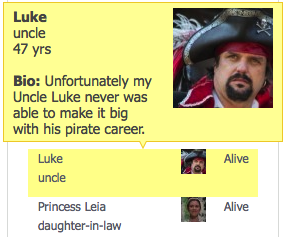
Up until now the online program only allowed students to enter names and relations for family members. But in 2.4.5 we have released features where students can now add pictures, bios, genders, and ages! And we have also tweaked the “Citizen Home Pages” to make it super easy for students to view one another’s families… and those of citizens from other countries too.

Our expectation is that these added family identity layers will not only improve the attachments CM participants have towards their families, but it will add fuel to the political, economic, and legal plot-lines that the simulation brings about. If Tony, for example, can’t provide food for his family and his Uncle Luke dies at the end of a simulated year, with these added layers of family identity, it will likely be easier for Tony to imagine the pain and shame and anger he might feel if something like this happened to someone in real life … And we’re hoping this will increase his desire to take civic or legal action in his simulated Town Hall or National Court… especially if a corrupt government, unjust laws, or nepotism were to blame.   

And above all, creating identities for your simulated family members is just plain fun.

National Identity Items

Like we explained in our 2.4.1 release, we have exciting plans in store for CM World: the space where teachers and students can see what’s going on in other simulated countries. In preparation for that, however, we developed and are releasing in 2.4.5 features that make it easier for countries to create and broadcast their national identities.

Waaay Better National Identity Pages

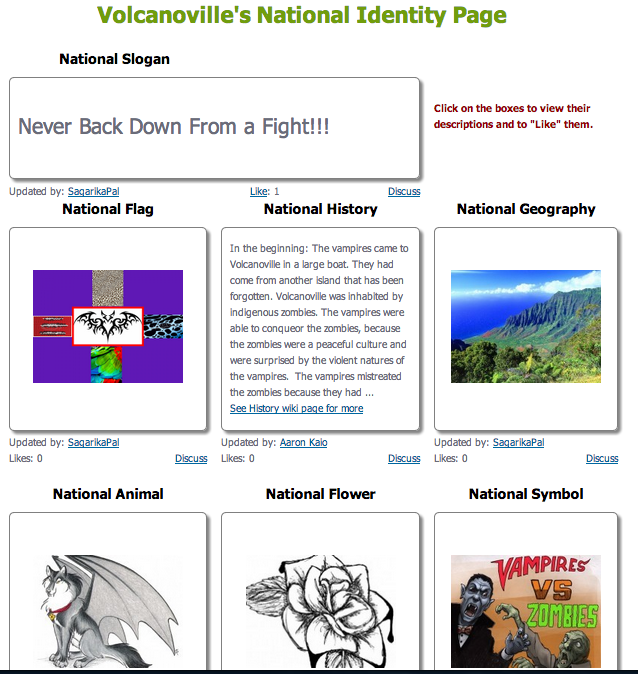
Like with families, it’s  remarkable how a name and a few symbols makes it easier for students to feel like members of a “real” nation. Formerly we used wiki pages to allow students to share their national identity items, but the wiki pages wouldn’t allow users to share and showcase their country throughout civicmirror.com. These new National Identity pages are fantastic and will take things to a whole new level in this regard.

To see what they look like, check out the first country to fully use their new National Identity page: Volcanoville. This is a country of 8th Grade students from Badger Rock Middle School in Madison, Wisconsin… led by their phenomenal teacher, Mr. Aaron Kaio.

National_Identity_Page


National Images Throughout CivicMirror.com

Tony_Flag

Flag on Country Homepage

The new National Identity pages are very important for our future goals of inter-country participation because they will allow users to quickly and easily showcase their national identities, which will (hopefully) increase their sense of “belonging” to their simulated countries. We also believe this shared content will improve the “visiting other countries” experience too.   

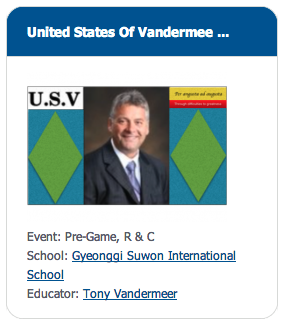
For example, the 8th Grade students at Gyeonggi Suwon International School, running a country called “United States of Vandermeer”, were the first to upload their national flag. Now, and as you can see in the images to the right, their flag appears in various places throughout the program.

And as the image below shows, now, when visiting a country, the flag appears beside the CM Event that country is in (beforehand it was all rather confusing when visiting a country).

Visiting_mode

Removal of Wiki Pages

The last 2.4.5 feature we want to talk about (there are many more) is our removal of most of the wiki-pages within civicmirror.com. While the templated i) Constitution, ii) Legislation, iii) Court Rulings, and iv) History pages will remain, we removed several others. We also took away students’ ability to create new their own wiki pages. This was a tough decision, but our reasons were the following:

  1. The new family and national identity features (above) are far superior to the wiki-versions of these pages
  2. Our discussion forums and wiki pages largely did the same things and were competing against one another
  3. The forums were way better at generating conversation, and
  4. We couldn’t integrate wiki page content throughout the site.

We hope you enjoy the new features and can’t wait to see your content!

Posted in CM News | Comments Off on Civic Mirror 2.4.5 Lets Users Customize in Entirely New Ways

Should Government $$ Transactions Be Open or Closed?

government-moneyWe want your feedback!

We are running out of room on the Government Main Page and are creating a new “Govt Finances & Assets” page that will house the following items:

  • Finances Summary box ($$ in bank and the tax rates)
  • Government-owned Properties
  • Government’s units, and
  • The Tax Revenue table

We have a whole column of space on the right-hand side and were thinking of creating a feed that would show the Government’s trades and financial transactions. At first we thought this feature would be great in creating all sorts of material for Town Hall debates and National Court cases, but then we realized that it wouldn’t at all simulate reality: there is no such thing as a 100% financially open government.

As well, some of the best stories we have heard from our users are about corrupt politicians getting caught, and we fear that a financial transaction feed would deter any and all types of corrupt transactions (not that we want to encourage student politicians to be corrupt, but we fear that the unrealistic transparency would steer students away from the very real temptations that do exist for politicians in the real world).

So we are seeking feedback! Using the comment space below, tell us what you think we should do with the space on the “Government Assets & Finances” page for! 

Should we create the government financial transaction feed, or should we use the space for something else related to government finances, and if so, what should that new feature be?

Posted in CM News | 6 Comments

Student Avatars and Community Controls in CM 2.4.1

Our programming team has been working under CM’s hood to get things ready for our big plans regarding inter-country competitions and enhanced community features that will make the CM experience even more engaging (which is saying a lot considering how well it engages social studies students already). While most of the prep-work can’t be seen right now, we added features in CM 2.4.1 that are really cool and foreshadow what’s to come.

Student Avatars

Last spring we added the ability for educators to add avatars, but with this release students can add avatars too. To illustrate, we’re going to use Ms. Erin Harrison’s “student” account from a CM Training session that occurred in Guelph, Ontario earlier this year. Erin has been using Civic Mirror for 2 years with much success and (not surprisingly) she ended up as her simulated country’s national leader in the training session.

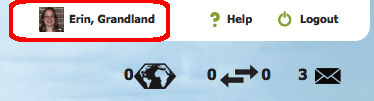
1. When students want to upload and/or edit their avatar, they simply need to click on their username/pic at the top-right of the CM interface (circled in red below):

profile_link

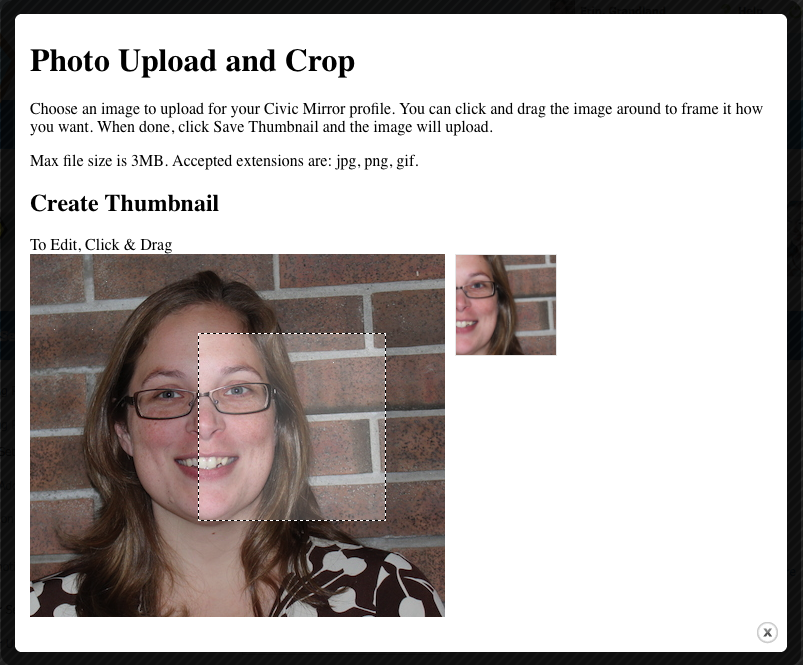
2. This will take them to their profile page where they can click the “Change Profile Picture” link. Here they can upload, crop and edit their desired photo.

pic_editor

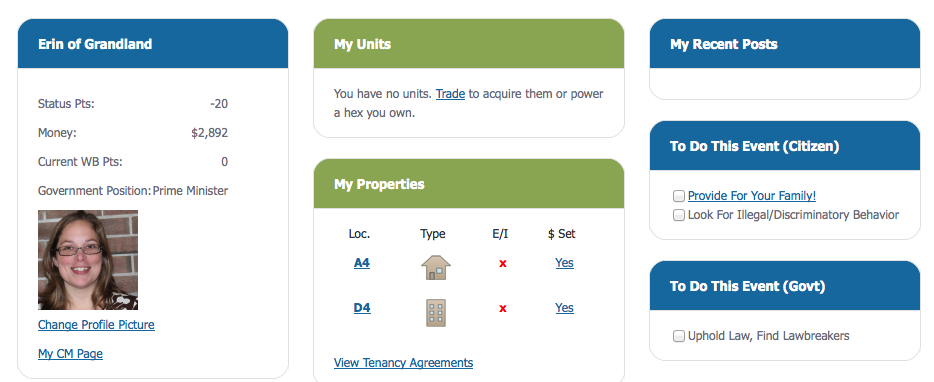
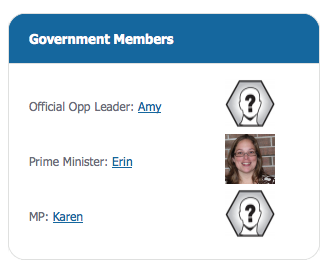
3. Once done, the student avatar will appear throughout the site for everyone to see. Below are a few examples:

Cit_homepage

Student Avatar on Citizen Homepage

Law_Govt_Pic

Law & Government page (when elected into office)

We are really excited about this and are looking forward to seeing students further develop their CM Identities as responsible, adult citizens. However, you teachers might be thinking, “OMG, but what about inappropriate avatars!?”  Not to worry, read on …

Community Controls

Community_Controls

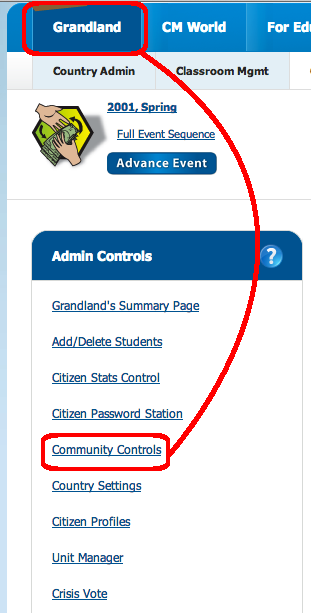
Teachers have long been able to block students from the CM Community and the entire website using the Citizen Stats Control page. But, with more and more community features in the pipeline, we created a new admin page solely devoted to “Community Controls”, which can be accessed from the Admin Controls box on the Main Admin page (see pic to the right).

Once there, you educators will see that every student’s avatar can be seen at a glance. This is great just for marking purposes (e.g. “Let’s see who uploaded their avatars like I asked them to”), but educators will also have the ability to remove inappropriate ones as well. And if they’re really bad, this is where teachers can block students from the CM Community or the entire site.

All for now. In an upcoming post we will highlight some of the other features that we released in CM 2.4.1.

And if you’re not using CM and want to see what all the fuss is about – for crying out loud – Request a Free Trial!


Posted in CM News | 1 Comment

Exciting New Features with Release of Civic Mirror 2.4.0

Program Now 100% Online, New Features for Teachers, and Twitter Hashtags

This latest CM version release, 2.4.0, is one for the books. Daniel Lindenberger (CM’s Lead Programmer) and Derek Lam (Programmer and Tech-Support Wizard) worked tirelessly over the summer on features that allow us to boast that we are 100% online. What that means is, while the program remains an event-based game, with events occurring in the classroom in a face-to-face way (mock elections, legislative events, trials, etc.), teachers now have the option to run the program without any paper at all. Let us explain.

Online, Mobile-Friendly Manuals

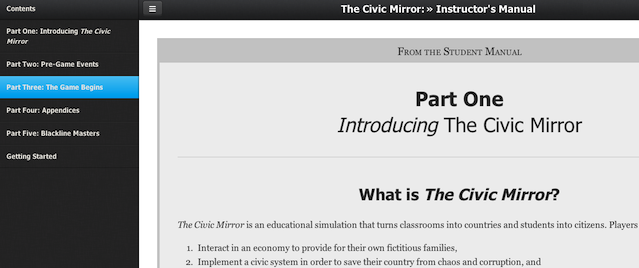
Like we promised in April, we have developed the Civic Mirror Instructor and Student manuals into an online, mobile-friendly format and included them as part of the program without any extra cost. This means students can follow the CM event scripts using their tablets or mobile phones. While most users still prefer having the manual in-hand, these mobile-friendly versions of the manuals provide a great option for teachers moving forward.

To access the CM Manual from within the program, simply click “CM Manual” from the main navigation bar (see image below) and away you go. What’s more is that the program automatically detects what version of the manual is relevant for you (e.g. U.S. teachers see the U.S. Instructors Manual, Canadian students see the CDN Student Manual, etc.).

Manual

Online Hidden Agendas

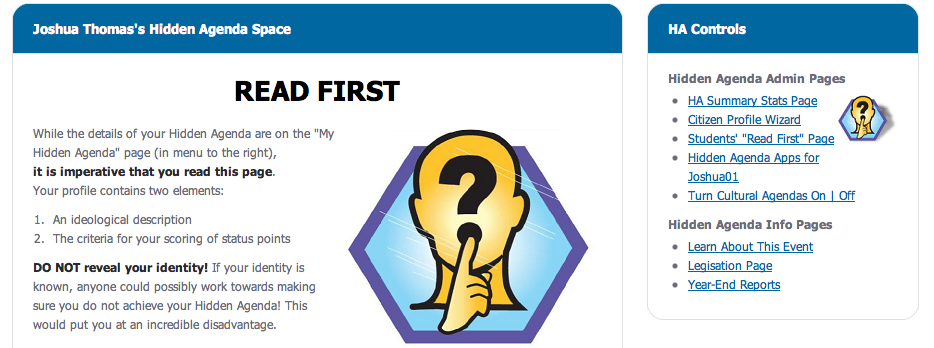
Another great feature we released with CM 2.4.0 is online Hidden Agendas (HA’s), complete with an HA Application and review system. This allows 1) Students to apply for their HA Status Points online, 2) Teacher to review submitted applications, and 3) easier awarding, rejecting, and tracking of the whole review process.
HA_Space

While this will save teachers huge chunks of class time (i.e. “You have to submit your Hidden Agenda Application for homework by tomorrow,”), we still recommend teachers initially give their students their HA’s using the paper-based, sealed-envelope method outlined in the Instructors Manual. It’s one thing peaking over a students shoulder to look at an agenda title on a piece of paper, but it’s far easier to glance at the agenda title displayed on a computer monitor.

Online Performance Evaluations
Evaluations

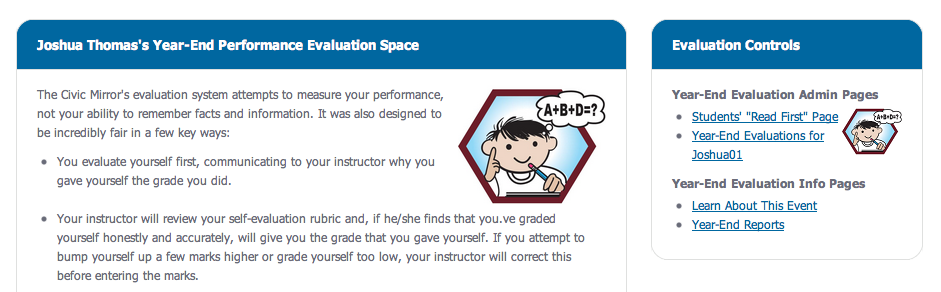
In the Civic Mirror, students complete a formative assessment rubric at the end of every simulated year. Basically they evaluate their performance as a citizen on four criteria: points-earned; attitude and involvement; initiatives; and demonstration of learning. This has always been a paper-pen process, with the teacher cross-evaluating the student-given-grade and providing feedback and a final score.

Now, with online performance evaluations, this can all be done online, allowing teachers to assign it for homework and – once submitted – to offer instant and immediate feedback to their students.

More New Features for Teachers
interface features

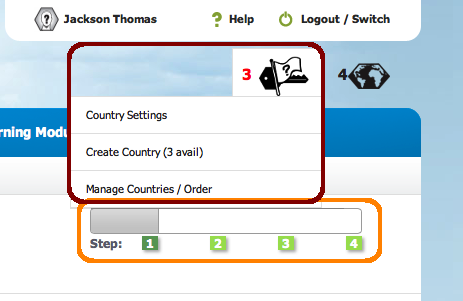
The Civic Mirror can be overwhelming for first time teachers, which makes sense considering what it accomplishes. This summer, however, we created a “Starting Steps” sequence to help newbies out a little more. Basically the program guides first-time users through some of the most important pages, displaying a progress bar too (see picture to right). We hope this helps.

Also, with the growing number of teachers using the program, we made some organizational improvements. For starters, we no longer blend educator profile and settings information with country settings information. As the picture above indicates, teachers now have a separate space to manage their country settings, create new countries, and order more.
Teacher_settings

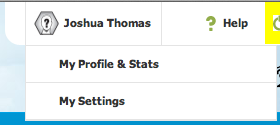
And, as the picture to the right illustrates, we created a page for Educators Profiles (for things like teacher bio, profile pic, list of countries, etc.), as well as a “My Settings” page (for things like email address, password, time zone, etc.).  While all these features existed before, they are now much more organized and easier to find.

Country-Specific Twitter Hashtags

Last year we observed a huge spike in the number of teachers who integrated Twitter into the Civic Mirror experience (e.g. back-channelling during political events, announcing news stories, etc.). Several of these teachers requested we integrate the social media platform into CM. We did.

Now, using the Country Settings page, CM Educators can enter a Twitter hashtag for a country so that all CM-related tweets get fed into the Country News page. What’s more, this will allow – for the first time – teachers and students to share a small part of the CM experience with the outside world.

Note that this is an optional feature, of course.

Posted in CM News | Comments Off on Exciting New Features with Release of Civic Mirror 2.4.0

Meet CM Resource Super-Creator, Ms. Amber Rainke!

New CM Library Resources!

CM Educator Ms. Amber RainkeWhile the Civic Mirror Library – a space for educators to share their customized and CM-related assignments, activities, and modifications – has been alive for several years, only recently did our development team cleaned it up for easy use. Ms. Amber Rainke, a social studies superstar from Frank Hurt Secondary in Surrey, BC, has created and shared no less than 5 resources … making this space even more awesome!

Amber uses the Canadian version of Civic Mirror and several of the resources she created help scaffold the content and CM experience for students.

Charter of Rights and Freedoms Aides

For Canadian educators who don’t have time to run the two-lesson Constitution Jigsaw activity but still want to cover this important information (after all, when the game starts, students use their own real-world country’s constitution as their book of law), Amber created and uploaded a Teen Version of the Charter of Rights and Freedoms and an accompanying slide show.

House of Commons Primer

When students participate in their first Government Event in the Civic Mirror, it can be overwhelming to say the least. Not only are students trying to push their hidden agendas and ensure the laws and policies passed will benefit their simulated families, but they are learning how the rules, roles, and procedures of the legislative process work!  Amber created a fantastic “House of Commons Intro” slideshow and an accompanying fill-in-the worksheet that teachers can to ensure their students write a record of the important content as they work through the slideshow. Awesome!

Election Debate Prep Sheet

Finally, Amber also created a worksheet titled Preparing for the Debate which can be used by both U.S. and Canadian teachers. She has her students use this well-structured sheet of important issues to better prepare their positions and arguments for their first election debates. To quote Amber:

I used this with my class to help them plan their strategies for the debate. I listed some guiding questions to help them frame an arguement or position on a topic that students often have questions about and will affect their hidden agendas.

On behalf of all the educators in the CM Community, thank you Amber! We appreciate your creations and sharing of them!

Posted in CM News | Comments Off on Meet CM Resource Super-Creator, Ms. Amber Rainke!

Coming Soon! Mobile-Friendly Online Civic Mirror Manuals!

No More PDF Draft Manuals!

Civic Mirror continues to improve. Today we’re happy to announce that we are roughly halfway through designing and developing online versions of the CM Manuals.

Because the simulation sets up in-class events that students run themselves, and because these events are guided by scripts in the Student Manual (e.g. mock elections script, mock congress/parliament script, etc.), the CM Manuals are essential. For the longest time there were only two options: (1) purchase class sets of the published versions (which are awesome BTW), or (2) download, print, and copy class sets of the PDF Draft versions. Both worked, but the DRAFT manuals required lots of extra leg-work for trial users to get started. This is changing soon!

While nothing will beat the published manuals that you can hold in your hand, in just a few weeks teachers and students will be able to use their computers, tablets, phones, or projectors to view them. We are stoked!

Sneak Preview

If you have any questions or feature requests before we finish the job, Contact Us ASAP!!

Posted in CM News | 1 Comment